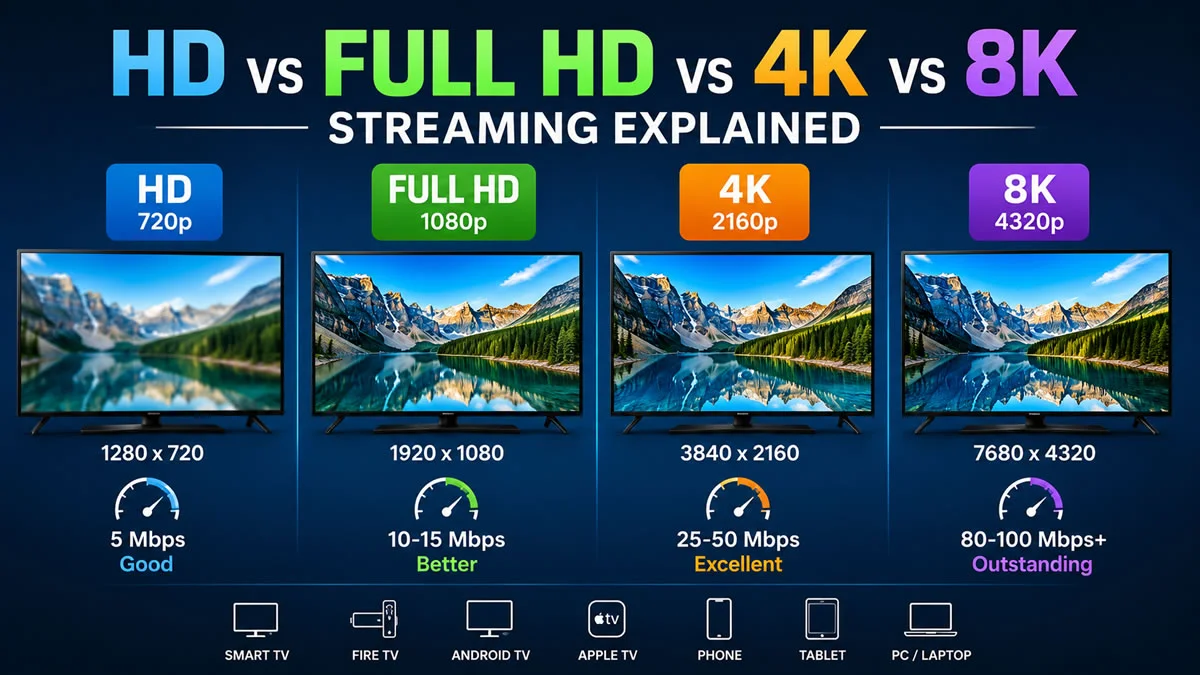
HD, Full HD, 4K, and 8K refer to different streaming resolutions that determine video clarity and detail. Higher resolutions like 4K and 8K offer sharper images, while HD and Full HD require less internet and work well on smaller screens.
Streaming technology has advanced rapidly over the last decade, giving viewers access to sharper visuals, richer colors, and more immersive entertainment. Whether you’re watching live sports, blockbuster movies, documentaries, or TV series, the streaming resolution you choose can have a significant impact on your viewing experience.
Terms like HD, Full HD, 4K Ultra HD, and 8K are now common across Smart TVs, streaming devices, and online video platforms. But what do these resolutions actually mean, and which one is the right choice for your setup?
In this guide, we’ll explain each streaming resolution, compare their differences, and help you decide which option best suits your internet connection, display, and viewing preferences.
What Does Streaming Resolution Mean?
Streaming resolution refers to the number of pixels displayed on your screen. More pixels generally create a sharper and more detailed image, especially on larger televisions.
Higher resolutions provide:
- Sharper picture quality
- Improved detail
- Better color accuracy
- Smoother viewing on larger screens
- More immersive entertainment
However, higher resolutions also require faster internet speeds and compatible hardware.
HD (720p) Streaming
High Definition, commonly called HD, has a resolution of 1280 × 720 pixels.
Although HD is no longer considered the highest quality, it still delivers a clear picture and remains suitable for smaller televisions, laptops, tablets, and smartphones.
HD Streaming Benefits
- Lower internet usage
- Smooth playback on slower connections
- Compatible with most devices
- Good for mobile viewing
- Faster loading times
Best For
- Smartphones
- Tablets
- Small TVs
- Basic internet connections
Full HD (1080p) Streaming
Full HD, also known as 1080p, offers a resolution of 1920 × 1080 pixels.
It provides noticeably sharper images than standard HD and remains one of the most popular streaming resolutions worldwide.
Full HD Advantages
- Excellent picture clarity
- Great balance between quality and bandwidth
- Crisp details
- Smooth sports streaming
- Ideal for everyday entertainment
Best For
- Smart TVs
- Fire TV devices
- Android TV
- Apple TV
- Gaming monitors
- Desktop computers
4K Ultra HD Streaming
4K Ultra HD features a resolution of 3840 × 2160 pixels, delivering four times the detail of Full HD.
This resolution has become the preferred choice for modern Smart TVs because it produces incredibly sharp images, vibrant colors, and excellent clarity on larger screens.
Benefits of 4K Streaming
- Extremely detailed picture
- Better HDR support
- More realistic colors
- Excellent for large televisions
- Cinematic viewing experience
Best For
- 4K Smart TVs
- Premium streaming devices
- Home theater setups
- Sports fans
- Movie enthusiasts
8K Streaming
8K represents the latest generation of consumer display technology with a massive resolution of 7680 × 4320 pixels.
It contains four times more pixels than 4K and sixteen times more than Full HD.
While 8K televisions are becoming more available, native 8K streaming content is still relatively limited.
Advantages of 8K
- Incredible image detail
- Outstanding sharpness
- Premium viewing experience
- Future-ready display technology
- Best performance on very large screens
Best For
- Large premium televisions
- Home cinema enthusiasts
- Technology enthusiasts
- Future-proof entertainment systems
HD vs Full HD vs 4K vs 8K Comparison Table
| Resolution | Pixel Size | Image Quality | Recommended Screen Size |
|---|---|---|---|
| HD | 1280 × 720 | Good | Up to 32 inches |
| Full HD | 1920 × 1080 | Very Good | 32–50 inches |
| 4K Ultra HD | 3840 × 2160 | Excellent | 50 inches and above |
| 8K Ultra HD | 7680 × 4320 | Outstanding | 65 inches and larger |
Internet Speed Requirements for Each Streaming Resolution
Streaming quality depends on both resolution and internet speed.
| Resolution | Recommended Speed |
|---|---|
| HD | 5 Mbps |
| Full HD | 10–15 Mbps |
| 4K Ultra HD | 25–50 Mbps |
| 8K Ultra HD | 80–100 Mbps or higher |
A stable connection is just as important as download speed. Ethernet connections or high-quality Wi-Fi networks generally provide a more consistent streaming experience.
Check to IPTV internet speed requirements
Which Devices Support These Resolutions?
Modern streaming devices support different maximum resolutions depending on their hardware capabilities.
Common compatible devices include:
- Smart TVs
- Android TV
- Google TV
- Amazon Fire TV devices
- Apple TV
- Streaming boxes
- Windows PCs
- Mac computers
- Smartphones
- Tablets
Always check your device specifications to confirm the highest supported resolution.
Read more about IPTV setup guide for all devices
Does Higher Resolution Always Mean Better Quality?
Not necessarily.
Several factors influence picture quality, including:
- Internet speed
- Video bitrate
- HDR support
- Display quality
- Screen size
- Viewing distance
- Source content
A well-encoded Full HD stream may appear better than a heavily compressed 4K video.
How to Choose the Right Streaming Resolution
The best resolution depends on your setup.
Choose HD if:
- You have a slower internet connection.
- You mostly watch on mobile devices.
- You want lower data usage.
Choose Full HD if:
- You watch on a standard Smart TV.
- You want excellent quality without high bandwidth requirements.
- You stream every day.
Choose 4K if:
- You own a 4K television.
- Your internet connection is fast and stable.
- You enjoy movies, sports, and premium entertainment.
Choose 8K if:
- You have an 8K-compatible TV.
- You want the highest available resolution.
- You’re investing in future-ready home entertainment.
Check IPTV subscription plans
Tips for Better Streaming Quality
To enjoy the best viewing experience:
- Use a high-speed broadband connection.
- Keep your streaming device updated.
- Place your Wi-Fi router centrally.
- Use Ethernet whenever possible.
- Close unnecessary downloads during streaming.
- Restart networking equipment occasionally.
- Choose the highest resolution your internet and device can handle.
Frequently Asked Questions
What is the difference between HD and Full HD?
HD has a resolution of 1280 × 720 pixels, while Full HD offers 1920 × 1080 pixels, providing a sharper and more detailed picture.
Is 4K worth upgrading to?
If you own a compatible television and have a fast internet connection, 4K can deliver significantly improved image quality compared to Full HD.
Does 8K require special equipment?
Yes. To view native 8K content, you’ll need an 8K-compatible television, compatible hardware, and a high-speed internet connection.
Can I stream 4K on any Smart TV?
No. Only televisions with 4K display panels can show true 4K resolution.
Does higher resolution use more internet data?
Yes. Higher resolutions generally consume more bandwidth because they transmit more visual information.
Which streaming resolution is best for most people?
For many households, Full HD and 4K Ultra HD provide the best balance between picture quality, internet requirements, and device compatibility.
Final Thoughts
Streaming resolution plays an important role in your overall viewing experience, but choosing the highest number isn’t always necessary. HD remains a practical choice for smaller screens and slower internet connections, while Full HD continues to offer excellent everyday performance.
For users with compatible devices and reliable broadband, 4K Ultra HD delivers impressive detail and cinematic picture quality. Although 8K represents the future of display technology, its benefits are most noticeable on very large screens and with compatible content.
Before selecting a streaming resolution, consider your internet speed, screen size, viewing distance, and device capabilities to find the option that provides the best balance of quality and performance.
[…] picture-quality terminology, read our HD, Full HD, 4K and 8K comparison. A resolution label should not replace checking the actual programme on your […]